
Smart home technology is rapidly evolving, offering homeowners unprecedented control and convenience. Among the most impactful smart devices are smart door locks, which provide enhanced security and peace of mind. When integrated with a powerful home automation platform like Home Assistant, smart door locks become even more versatile and can be customized to fit your specific needs.
This article explores the benefits of using smart door locks with Home Assistant, guiding you through the selection process, integration steps, automation possibilities, and security considerations. By the end, you’ll have a comprehensive understanding of how to leverage smart door locks and Home Assistant to create a truly secure and intelligent home.
Securing your home with smart technology doesn’t have to be complicated. With the right knowledge and a little effort, you can transform your entryway into a smart, secure, and convenient access point.
Understanding Smart Door Lock Technology
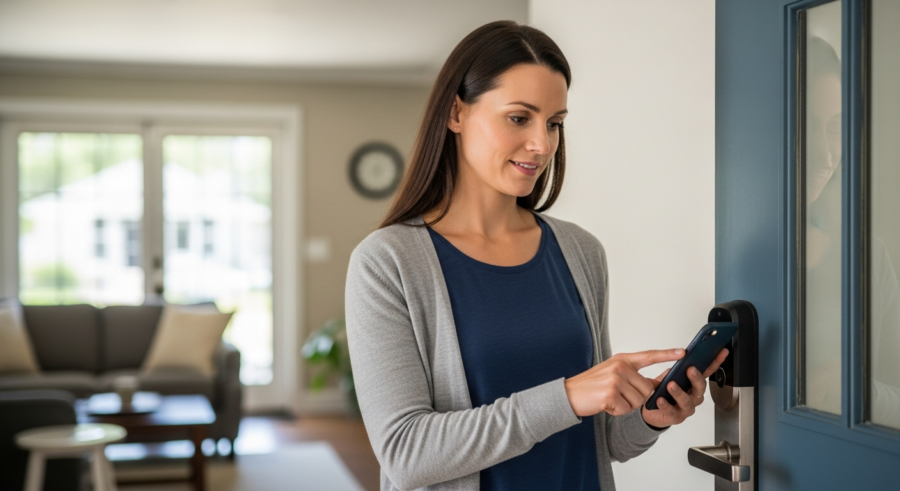
Smart door locks are electronic locking mechanisms that allow you to control access to your home remotely. They replace traditional key-based locks with digital technology, offering features like keyless entry, remote locking and unlocking, and activity monitoring.
These locks typically connect to your home network via Wi-Fi, Bluetooth, or Z-Wave, enabling communication with your smartphone or other smart home devices. Understanding the core components and functionalities of smart door locks is crucial before diving into integration with Home Assistant.
One of the primary features of smart door locks is keyless entry. This eliminates the need for physical keys, reducing the risk of lost or stolen keys and offering the convenience of entering your home with a code, fingerprint, or smartphone app.
Remote access is another significant advantage, allowing you to lock or unlock your door from anywhere in the world using your smartphone. This is particularly useful for letting in guests, delivery personnel, or service providers when you’re not at home.
Smart door locks often incorporate advanced encryption methods to safeguard against unauthorized access. These encryption protocols protect the communication between the lock and your smartphone or home automation hub. This ensures that only authorized users can control the lock.
Activity monitoring provides a detailed log of who has accessed your home and when. This feature can be invaluable for security purposes, allowing you to track entry and exit times and identify any suspicious activity. Some systems even offer real-time notifications when the door is locked or unlocked.
Many smart door locks are designed to be tamper-resistant, incorporating features that deter burglars from attempting to force entry. These features may include reinforced strike plates, tamper alarms, and physical designs that make it difficult to pick or break the lock.
The integration of smart door locks with other smart home devices creates a more comprehensive and automated security system. For example, you can link your smart lock to your security cameras, so that the cameras record footage whenever the door is unlocked.
Benefits of Using Smart Locks with Home Assistant
Integrating smart door locks with Home Assistant unlocks a wide range of benefits, extending beyond the basic functionalities offered by the lock itself. Home Assistant acts as a central hub, allowing you to connect your smart lock with other smart devices and create custom automation rules.
This integration enhances security, convenience, and energy efficiency, making your home smarter and more responsive to your needs. The possibilities are nearly endless when you combine the power of smart door locks and door lock automation with the flexibility of Home Assistant.
Enhanced security is a major advantage, as Home Assistant allows you to monitor door lock activity in real-time and receive alerts for any unauthorized access attempts. You can also create automation rules that trigger alarms or notifications if the door is left unlocked for an extended period.
Increased convenience is another key benefit, as you can create custom automation routines that simplify your daily life. For example, you can set up a rule that automatically unlocks the door when you arrive home and disarms the security system.
Home Assistant provides a unified platform for managing all your smart home devices, including your smart door lock. This eliminates the need to use multiple apps from different manufacturers, simplifying the control and monitoring of your home security system.
With Home Assistant, you can create complex automation routines that involve multiple devices and actions. For example, you can set up a routine that locks the door, turns off the lights, and adjusts the thermostat when you leave home.
Home Assistant allows you to customize the behavior of your smart door lock to fit your specific needs and preferences. You can create custom notifications, set up specific access codes for different users, and adjust the sensitivity of the lock’s sensors.
The integration of smart door locks with Home Assistant can also improve energy efficiency. For example, you can set up a rule that automatically turns off the lights and lowers the thermostat when the door is locked, ensuring that you’re not wasting energy when you’re away from home.
Choosing the Right Smart Door Lock for Your Home
Selecting the right smart door lock is essential to ensure seamless integration with Home Assistant and meet your specific security and convenience requirements. There are several factors to consider when choosing a smart door lock, including compatibility, features, security, and price.
Carefully evaluating these aspects will help you make an informed decision and select a smart door lock that perfectly complements your smart home ecosystem. Consider your budget, desired features, and the level of security you need when making your choice.
| Feature | Description | Considerations |
|---|---|---|
| Compatibility | Ensures seamless integration with Home Assistant | Check for Z-Wave, Zigbee, or Wi-Fi support |
| Keyless Entry | Offers various methods for unlocking the door | Choose between keypad, fingerprint, or smartphone app |
| Remote Access | Allows locking and unlocking from anywhere | Requires a stable internet connection |
| Activity Monitoring | Tracks door lock activity and provides notifications | Useful for security and peace of mind |
Compatibility with Home Assistant is paramount, as it determines how well the smart lock will integrate with your existing smart home setup. Look for smart locks that support Z-Wave, Zigbee, or Wi-Fi, as these protocols are commonly supported by Home Assistant.
Keyless entry options vary among smart door locks, with some offering keypad entry, fingerprint scanning, or smartphone app control. Consider which method is most convenient and secure for your needs.
Consider the battery life of the smart door lock, as this can impact its convenience and reliability. Look for locks that offer long battery life and provide low-battery warnings to avoid unexpected lockouts.
Evaluate the security features of the smart door lock, such as encryption, tamper resistance, and alarm capabilities. Choose a lock that offers robust security measures to protect your home from unauthorized access.
Think about the design and aesthetics of the smart door lock, as it will be a visible part of your home’s exterior. Choose a lock that complements your home’s style and fits your personal preferences.
Read reviews and compare different smart door lock models to get a better understanding of their performance and reliability. Consider the experiences of other users before making your final decision.
Integrating Smart Locks with Home Assistant
Integrating your smart door lock with Home Assistant involves a few key steps, depending on the communication protocol used by the lock. Generally, you’ll need to add the lock to your Home Assistant instance and configure it to work with your existing devices and automations.
The process may vary slightly depending on the specific smart lock model and the type of Home Assistant installation you have. However, the basic principles remain the same: connect the lock to your network, add it to Home Assistant, and configure its settings.
For Z-Wave or Zigbee locks, you’ll need a compatible Z-Wave or Zigbee USB dongle connected to your Home Assistant server. Once the dongle is set up, you can add the smart lock to your Z-Wave or Zigbee network through the Home Assistant interface.
For Wi-Fi locks, you’ll typically need to install a custom integration or use the manufacturer’s cloud service to connect the lock to Home Assistant. Follow the instructions provided by the lock manufacturer or the Home Assistant integration documentation to complete the setup.
Once the smart lock is added to Home Assistant, you’ll need to configure its settings, such as the lock’s name, location, and security preferences. You can also create custom entities and attributes to represent the lock’s status and functionality.
After configuring the lock’s settings, you can start creating automation rules that involve the smart lock. You can use the lock’s status (locked or unlocked) as a trigger for other actions, such as turning on the lights or disarming the security system.
You can also use Home Assistant’s scripting capabilities to create more complex automation routines that involve the smart lock. This allows you to customize the behavior of the lock to fit your specific needs and preferences.
Be sure to test your smart lock integration thoroughly to ensure that it’s working properly and that all automation rules are functioning as expected. This will help you identify and resolve any issues before they become a problem.
Creating Automation Rules for Smart Locks
One of the most powerful aspects of integrating smart door locks with Home Assistant is the ability to create custom automation rules. These rules allow you to automate various tasks based on the lock’s status, time of day, or other triggers.
By creating automation rules, you can make your home more secure, convenient, and energy-efficient. The possibilities are limited only by your imagination and the capabilities of your smart home devices.
- Automatically lock the door at a specific time each night
- Unlock the door when you arrive home based on your phone’s location
- Trigger a security alarm if the door is forced open
- Turn on the lights when the door is unlocked after dark
- Send a notification when a specific user unlocks the door
For example, you can create a rule that automatically locks the door at a specific time each night to ensure your home is always secure. You can also set up a rule that unlocks the door when you arrive home based on your phone’s location, providing a seamless and convenient entry experience.
Another useful automation is to trigger a security alarm if the door is forced open, alerting you and your neighbors to a potential break-in. You can also create rules that turn on the lights when the door is unlocked after dark, improving visibility and safety.
Consider creating a rule that sends a notification to your smartphone when a specific user unlocks the door. This can be particularly useful for parents who want to know when their children arrive home from school.
You can also create rules that integrate the smart door lock with other smart home devices. For example, you can set up a routine that turns on the TV and starts playing your favorite music when the door is unlocked.
Experiment with different automation rules to find the ones that best fit your needs and preferences. The more you customize your smart home system, the more convenient and efficient it will become.
Security Considerations for Smart Door Locks
While smart door locks offer numerous benefits, it’s important to be aware of the potential security risks associated with these devices. Like any connected device, smart door locks can be vulnerable to hacking or other security breaches if not properly secured.
Taking appropriate security measures is crucial to protect your home and personal information from unauthorized access. By implementing these best practices, you can minimize the risks and enjoy the benefits of smart door locks with peace of mind.
One of the most important security measures is to choose a smart door lock from a reputable manufacturer with a strong track record of security. Look for locks that use encryption and other security protocols to protect your data from being intercepted.
It’s also essential to use strong, unique passwords for your smart lock and Home Assistant accounts. Avoid using default passwords or easily guessable combinations, and enable two-factor authentication for added security.
Keep your smart door lock’s firmware and software up to date to patch any security vulnerabilities. Manufacturers regularly release updates to address security issues, so it’s important to install them promptly.
Be cautious about granting access to your smart door lock to third-party services or applications. Only grant access to trusted services and review their privacy policies carefully.
Regularly monitor your smart door lock’s activity logs for any suspicious activity. This can help you identify and address any potential security breaches.
Consider using a virtual private network (VPN) to encrypt your internet traffic and protect your smart door lock from being hacked. A VPN can add an extra layer of security to your smart home network.
Advanced Smart Lock Features
Beyond basic locking and unlocking, many smart door locks offer advanced features that can further enhance your home security and convenience. These features include temporary access codes, geofencing, and integration with video doorbells.
Exploring these advanced capabilities can help you tailor your smart door lock system to your specific needs and preferences. Consider which of these features would be most beneficial for your lifestyle and security requirements.
Temporary access codes allow you to grant access to guests, service providers, or delivery personnel for a limited time. This eliminates the need to share your permanent access code and provides greater control over who can enter your home.
Geofencing uses your smartphone’s location to automatically lock or unlock the door when you enter or leave a predefined area. This feature can be particularly useful for busy families or individuals who frequently forget to lock the door.
Integration with video doorbells allows you to see and speak to visitors before unlocking the door. This can enhance your security and provide greater peace of mind.
Some smart door locks offer voice control integration, allowing you to lock or unlock the door using voice commands. This can be particularly convenient when your hands are full.
Consider smart door locks with built-in alarms that sound when the door is forced open or tampered with. This can deter burglars and alert you to potential break-ins.
Explore smart door locks with auto-lock features that automatically lock the door after a certain period of time. This can help ensure that your home is always secure, even if you forget to lock the door yourself.
Troubleshooting Common Smart Lock Issues
Like any electronic device, smart door locks can sometimes experience technical issues. Common problems include connectivity issues, battery drain, and lock malfunctions.
Knowing how to troubleshoot these issues can save you time and frustration, ensuring your smart door lock system remains reliable and functional. Here are some tips for resolving common smart lock problems.
If your smart lock is experiencing connectivity issues, first check your Wi-Fi or Z-Wave/Zigbee network connection. Make sure your router is working properly and that the smart lock is within range of the network.
If the battery is draining quickly, try replacing it with a fresh set of batteries. Some smart locks also offer low-battery warnings, so you can replace the batteries before they die completely.
If the lock is malfunctioning, try resetting it to its factory settings. This can often resolve minor software glitches.
Check the door alignment to ensure that the lock is properly aligned with the strike plate. Misalignment can cause the lock to jam or malfunction.
If you’re experiencing issues with the Home Assistant integration, check the logs for any error messages. This can help you identify the source of the problem.
Consult the smart door lock’s documentation or the manufacturer’s website for troubleshooting tips. They may have specific instructions for resolving common issues.
Maintaining Your Smart Door Lock
Proper maintenance is essential to ensure the longevity and reliability of your smart door lock. Regular cleaning, lubrication, and software updates can help keep your smart lock in optimal condition.
Following these maintenance tips will help you avoid costly repairs and ensure your smart door lock continues to provide secure and convenient access to your home. A little preventative care can go a long way in extending the life of your smart lock.
Clean the exterior of your smart door lock regularly with a soft, damp cloth. Avoid using harsh chemicals or abrasive cleaners, as these can damage the finish.
Lubricate the lock mechanism periodically with a silicone-based lubricant. This will help ensure smooth operation and prevent the lock from sticking or jamming.
Replace the batteries regularly, even if they’re not completely dead. This will help prevent unexpected lockouts.
Check the door alignment periodically to ensure that the lock is properly aligned with the strike plate. Adjust the alignment if necessary.
Keep the area around the smart door lock clear of debris and obstructions. This will help prevent the lock from malfunctioning.
Install firmware and software updates promptly to patch any security vulnerabilities and improve performance.
The Future of Smart Door Locks and Home Assistant
The future of smart door locks and Home Assistant looks promising, with ongoing advancements in technology and increasing integration with other smart home devices. As technology evolves, we can expect to see even more sophisticated and user-friendly smart door lock systems.
These advancements will further enhance the security, convenience, and automation capabilities of smart door locks, making them an even more integral part of the smart home ecosystem. Keep an eye on emerging trends and innovations in this space to stay ahead of the curve.
One trend to watch is the increasing use of biometric authentication, such as facial recognition and voice control. These technologies offer even more secure and convenient ways to access your home.
Another trend is the integration of smart door locks with other smart home platforms, such as Apple HomeKit and Google Assistant. This will allow you to control your smart door lock using your voice or other smart home devices.
We can also expect to see more advanced security features, such as tamper detection and intrusion prevention systems. These features will help protect your home from unauthorized access.
Smart door locks will likely become more energy-efficient, with longer battery life and improved power management. This will reduce the need for frequent battery replacements.
The integration of smart door locks with other smart home devices will become even more seamless and intuitive. This will allow you to create more complex and personalized automation routines.
Smart door locks will likely become more affordable and accessible to a wider range of homeowners. This will make smart home security more attainable for everyone.
Conclusion
Smart door locks offer a compelling combination of security, convenience, and automation, making them a valuable addition to any smart home. When integrated with Home Assistant, these locks become even more powerful, allowing you to create custom automation rules and integrate them with other smart devices.
By carefully selecting the right smart door lock, following the integration steps, and implementing appropriate security measures, you can transform your home into a truly smart and secure environment. Embrace the possibilities and enjoy the peace of mind that comes with knowing your home is protected by cutting-edge technology.